Help Center / For Operators / Uploading documents for accuracy
Uploading documents for accuracy
Upload sermon notes or a glossary so names and key terms come through right.
3 min read
Names of people, places, and ministries — and any special vocabulary — translate best when Jesus Speaks knows to expect them. Upload your notes and it will.
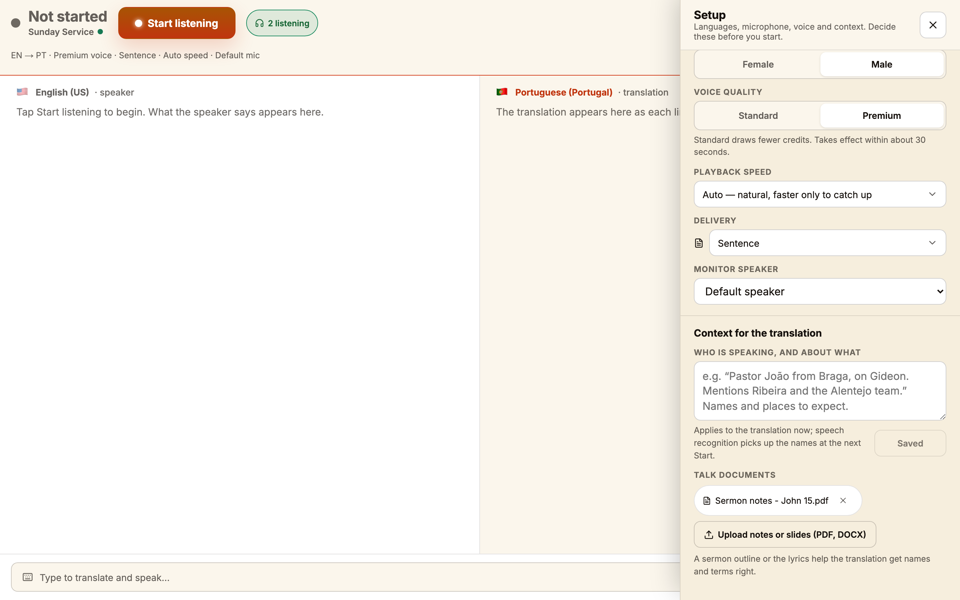
- 1Open the document upload on the operator screen.
- 2Add your sermon notes, a slide outline, or a short glossary of key terms.
- 3Start your session — those terms are now transcribed and translated correctly.
Tip
What helps most
Proper nouns are the big win: people's names, place names, ministry and brand terms, and any unusual words you'll say. Even a short list makes a noticeable difference.
Still stuck?Report a problem →
Related articles
For Operators